1Year
Trusted by 10,000+ Schools · 1st Anniversary2025.10 — 2026.10 · Generation 2.0 Global Debut

Classroom Speaker THE NEXT GENERATION

Generation 2Campus System

Now Open for Upgrade · Generation 2.0

From announcements to dynamic desktop, two-way voice and campus management.
Seamless in-place upgrade from Gen 1. Existing classes preserved automatically.

Dynamic Classroom WallpaperGen 2.0
08:30
Oct 31 Sunny 23°C
Saturday · Week 9
Midterm Exam21d2026.11.21 08:00
Notice2 Unread (Today)
Sample SchoolOnline701

Today's Assignments 2 Items

MathComplete exercise chapter 6Due Tomorrow

EnglishRead unit text & vocabularyDue Tomorrow

Daily Motto

Doing your best today is
the best preparation for tomorrow.

Class Duty

Group 1Classroom Clean

Group 2Blackboard

Group 3Corridor

Group 4Windows Check

Schedule

Recess
  1. MorningReading
  2. Period 1English
  3. Period 2Math
  4. Period 3Science
  5. Period 4PE
  6. Period 5History
  7. Period 6Study

Attendance

Leaves

Sick 1 · Personal 1

Absent

None

Campus Safety

Walk calmly in corridors, keep right on stairs.

Classroom Speaker | www.810086.com
Live Demo · Sample Data
2026.10.31 · Generation 2.0 Global Release10,000+ Schools Worldwide ↓
1st Education
★ 2025 — 2026 Trusted by 10,000+ Schools

Empowering 10,000+ campuses.
Embarking on Generation 2.0.

10,000+Partner Schools (10k+)
200,000+Active Teachers
  1. Official Launch
  2. Public Release
  3. 1st Anniversary · Gen 2.0 Debut

01 / Dynamic Classroom Wallpaper

What matters most,
visible at a glance.

Transform classroom screens with a smart overlay of real-time schedule, assignments, and alerts.
60% non-intrusive layout leaves the left 40% open for regular teaching software.

Try the interactive desktop above ↗

02 / Two-Way Audio Intercom

Teacher,
a student is calling.

Two-way voice connection between classrooms and teacher phones.
Direct, instant communication without running to the office.

  • Classroom real-time online status
  • Student caller ID so teachers know who is calling
Classroom · Call Teacher···

Live Audio Intercom

Mr. Lee ⌄
Alex · No. 007 ⌄
Ready to call
Call TeacherMuteEnd
9:41 ▰ ▰

Classroom Incoming Call

701

Grade 7 · Class 1

Alex · No. 007Calling…
Mute
Speaker
Hang up
Live Demo

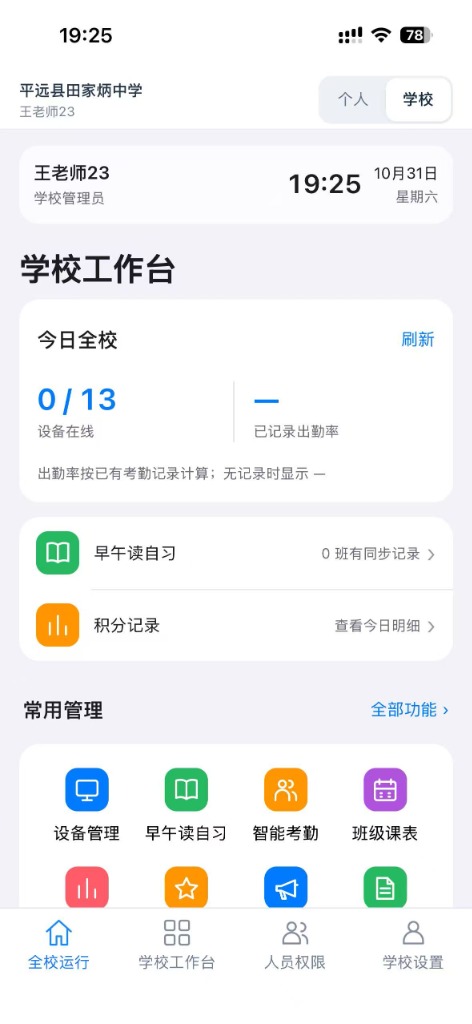
03 / School-Wide Workbench · Newly Released

One-Click Control,
Connecting the Whole Campus.

From single-room announcements to comprehensive campus management on one screen.
Real-time device monitoring, campus-wide broadcast, morning study attendance, student scores, and assignments straight to every screen.
Enabling administrators, grade heads, and teachers to collaborate effortlessly.

  • Device Status Dashboard: Real-time monitoring of interactive displays in every room
  • Instant Campus Broadcast: Send audio and notices to specific grades or all screens
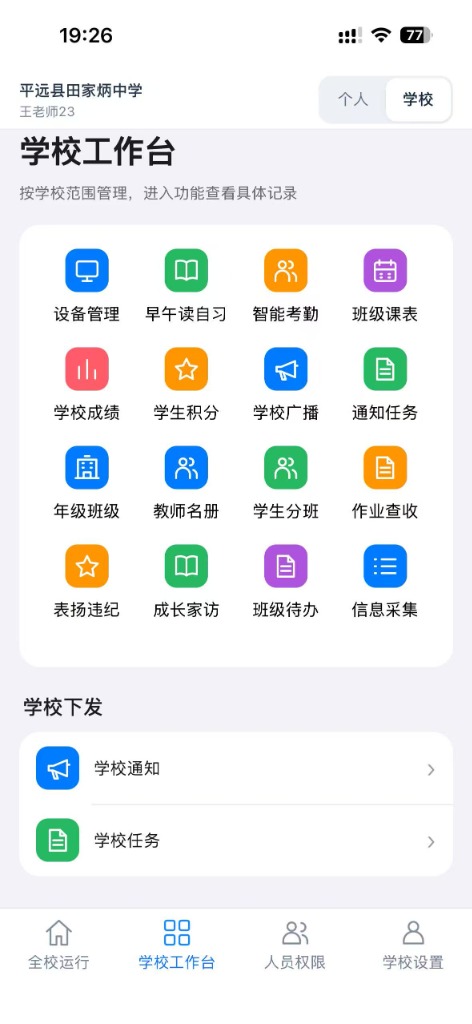
  • 16 Management Modules: Devices, schedules, attendance, assignments, and student logs
School workbench campus device overview
Campus Operations · Live Dashboard
School workbench 16 management modules
16 Modules · Multi-Role Synergy

From Pioneer to Continuing Leader

Cross-Generation Leap, Fully Upgraded.

01

Smart Information Display

From separate popups to the dynamic classroom wallpaper dashboard.

02

Two-Way Communication

Instant two-way voice intercom between classrooms and teacher phones.

03

School-Wide Synergy

Web portal, mobile apps, and mini-programs connecting the entire campus.

The Next Journey Together

Connecting Every Classroom.

Download the official 2.0.8 classroom client for Windows 10 / 11 (64-bit).

Download Official 2.0.8 Go to Full Download Center (Win 10/11 · Win 7 · Linux · Mobile) ↗

Dynamic Wallpaper · Classroom Display

Sample School & Class Data · System wallpaper preserved, regular software works as usual

Feedback ↗